Chris Vizes Data visualisation and more
How do we set this all up then?
Alrighty, let’s see if we can vibe code an extension for a Tableau Next dashboard now then.
I’ve given claude a list of documentation sources and access to my blogs. I have requested an extension plan and have let it work away reading and reasoning.
On it’s first go, it came up with this plan:
Plan: D3 Network Chart — Tableau Next Dashboard Extension
Context
The goal is to build a Salesforce Lightning Web Component (LWC) that renders a D3 force-directed network chart and can be dropped into a Tableau Next dashboard as a custom extension. The project lives at /Users/chris/Git-Repos/HelloWorldLightningWebComponent, which is already a working SFDX project (API v66.0) containing only the basic helloWorld component from the blog tutorial.
The immediate deliverable is a chart on dummy data. A later phase will wire it to a specific Data Cloud / Data 360 semantic model via the Semantic Query API.
Key Technical Considerations
1. LWR Runtime — use the custom resourceLoader workaround
Tableau Next runs on Lightning Web Runtime (LWR), which has restrictions that break the standard lightning/platformResourceLoader. The lwc-recipes-main project ships a resourceLoader utility component that works around this. We need to either copy that component into our project or replicate its logic. Without this the D3 script will silently fail to load.
2. analytics__Dashboard target in js-meta.xml
The component will not appear in the Tableau Next extension picker unless the metadata file declares:
<target>analytics__Dashboard</target>
<isExposed>true</isExposed>
Standard targets (lightning__AppPage, etc.) are insufficient.
3. D3 must be a Salesforce Static Resource
D3 cannot be loaded from a CDN inside a Salesforce org. It must be uploaded as a static resource (zip or individual file). The import pattern is:
import D3 from '@salesforce/resourceUrl/d3';
// then: await loadScript(this, D3 + '/d3.v5.min.js');
The recipes project already bundles D3 v5 at /Extension Testing/lwc-recipes-main/force-app/main/default/staticresources/d3/. We copy this into our project.
4. D3 version — v5
The libsD3 recipe (our blueprint) uses D3 v5. v5 uses d3.event for drag events, while v7 changed to passing the event as a parameter. Using v5 keeps our code directly comparable to the documented recipe. We can upgrade later.
5. Extensions SDK
The SDK is automatically injected by the Tableau Next runtime; there is no npm package to import. For now we focus on rendering the chart; SDK event wiring (filter/parameter subscriptions) is out of scope for Phase 1. The SDK entry point when needed is:
// accessed via DashboardWidgetComponentProps, passed into the component
const sdk = this.sdk; // injected prop
await sdk.getDashboardContext();
sdk.subscribe(SDK_EVENTS.FILTER_CHANGE, handler);
6. SVG sizing — responsive with viewBox
Fixed pixel dimensions (like the recipe’s 400×400) look poor in a dashboard tile that can be resized. We use a viewBox with preserveAspectRatio and width="100%" height="100%" so the simulation fills the available space.
7. lwc:dom="manual" required
D3 manipulates the DOM directly. The SVG element must carry lwc:dom="manual" to opt out of LWC’s synthetic shadow DOM restrictions on direct DOM mutation.
Files to Create / Modify
New component: d3NetworkChart
force-app/main/default/lwc/d3NetworkChart/
├── d3NetworkChart.html         ← SVG container with lwc:dom="manual"
├── d3NetworkChart.js           ← D3 force simulation logic
├── d3NetworkChart.js-meta.xml  ← analytics__Dashboard target config
├── d3NetworkChart.css          ← link/node styling
└── data.js                     ← dummy network data (business-themed)
New utility component: resourceLoader
force-app/main/default/lwc/resourceLoader/
└── resourceLoader.js           ← copied from lwc-recipes-main (LWR workaround)
Source: /Users/chris/Git-Repos/Extension Testing/lwc-recipes-main/force-app/main/default/lwc/resourceLoader/resourceLoader.js
New static resource: d3
force-app/main/default/staticresources/
├── d3/
│   ├── d3.v5.min.js
│   └── style.css
└── d3.resource-meta.xml        ← content type: application/zip
Source files: /Users/chris/Git-Repos/Extension Testing/lwc-recipes-main/force-app/main/default/staticresources/d3/
Implementation Steps
Step 1 — Copy static resources
Copy the d3 static resource folder and its .resource-meta.xml from the recipes project into force-app/main/default/staticresources/.
Step 2 — Copy/create resourceLoader utility LWC
Copy resourceLoader.js (and create a minimal js-meta.xml for it) from the recipes project. This utility is imported in Step 4 instead of lightning/platformResourceLoader.
Step 3 — Create data.js with dummy network data
Produce a small, business-themed dataset (e.g., product categories and their relationships, or a mini account hierarchy). Format:
export default {
  nodes: [{ id: 'Node A', group: 1 }, ...],
  links: [{ source: 'Node A', target: 'Node B', value: 3 }, ...]
};
Step 4 — Create d3NetworkChart.js
Key patterns (adapted from libsD3 recipe):
- Import
loadScriptfromc/resourceLoader(LWR-safe, notlightning/platformResourceLoader) - Import D3 from
@salesforce/resourceUrl/d3 - Import data from
./data - Use
renderedCallbackwithd3Initializedguard initializeD3()builds a force simulation with link, charge, and center forces- Draggable nodes via
d3.drag() - Node colour by
groupusingd3.scaleOrdinal(d3.schemeDark2)
Step 5 — Create d3NetworkChart.html
<template>
  <div class="chart-container">
    <svg class="d3" width="100%" height="100%" lwc:dom="manual"></svg>
  </div>
</template>
Step 6 — Create d3NetworkChart.css
Style links (stroke, opacity) and nodes (stroke, fill, cursor). Match Tableau Next’s neutral colour palette where possible.
Step 7 — Create d3NetworkChart.js-meta.xml
<?xml version="1.0" encoding="UTF-8"?>
<LightningComponentBundle xmlns="http://soap.sforce.com/2006/04/metadata">
    <apiVersion>66.0</apiVersion>
    <isExposed>true</isExposed>
    <targets>
        <target>analytics__Dashboard</target>
    </targets>
    <targetConfigs>
        <targetConfig targets="analytics__Dashboard">
            <property name="chartTitle" type="String" label="Chart Title"
                      description="Title displayed above the network chart" />
        </targetConfig>
    </targetConfigs>
</LightningComponentBundle>
Verification
- Deploy to org: Right-click
force-app/main/default→SFDX: Deploy This Source to Org(orsf project deploy start) - Open a Tableau Next dashboard in the org
- Click Extensions in the toolbar —
d3NetworkChartshould appear in the picker - Add the extension to the dashboard — the force-directed network should render and nodes should be draggable
- Resize the tile — chart should scale responsively via the
viewBox - Check browser console for any D3 load errors (toast error =
resourceLoaderissue)
Future Phase: Data Cloud / Semantic Query API
When ready to replace dummy data with a real semantic model:
- Add
<hasStep>true</hasStep>totargetConfigin the metadata file — this enables binding to a dashboard step (dataset) - Use the Semantic Query API endpoint:
POST /services/data/v59.0/semantic-engine/gateway- Auth via Salesforce access token (already available in LWC context via
@salesforce/apexor user session) - Requires
CDP Semantic Query Permissionsenabled on the org
- Map the API response (nodes = entities, links = relationships/measures) into the D3 data format
- Optionally subscribe to
SDK_EVENTS.FILTER_CHANGEso the chart re-queries when dashboard filters change
I’ve accepted and let it churn away… It summarised th changes as follows:
What was created
3 new additions to the SFDX project at force-app/main/default/:
1. d3NetworkChart LWC — the extension itself
| File | Purpose |
|---|---|
d3NetworkChart.html |
Template with lwc:dom="manual" SVG; optional title via {chartTitle} |
d3NetworkChart.js |
D3 v5 force-directed simulation with draggable nodes, group colouring, and node labels |
d3NetworkChart.js-meta.xml |
analytics__Dashboard target — makes it visible in the Tableau Next extension picker |
d3NetworkChart.css |
Dark-themed styles matching Tableau Next’s aesthetic |
data.js |
15 business-named account nodes across 6 groups, with 24 relationship links |
2. resourceLoader utility LWC
Copied from the recipes project — required workaround for LWR runtime, which blocks lightning/platformResourceLoader.
3. d3 static resource
D3 v5 minified JS + style CSS, required because Salesforce orgs cannot load scripts from external CDNs.
To deploy and test
- In VS Code command palette: SFDX: Deploy This Source to Org (or
sf project deploy start --source-dir force-app) - Open a Tableau Next dashboard in your org
- Click Extensions in the toolbar —
d3NetworkChartshould appear - Add it to the dashboard — you should see the force-directed network with draggable nodes
- Optionally set a “Chart Title” in the component properties panel ```
I’m now deploying…
Some errors and back and forth with claude…
Successful deployment
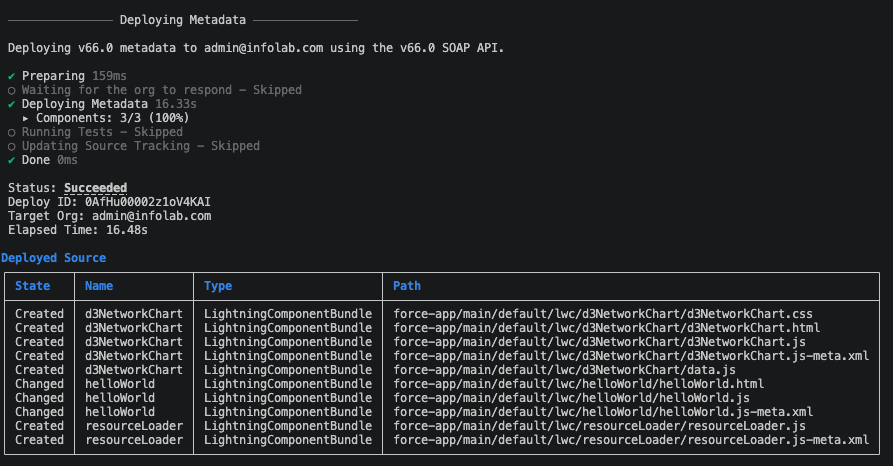
In Tableau Next I can now open a dashboard, click add extension and my new extension appears! But when added I get:
This page has an error. You might just need to refresh it.
[NoErrorObjectAvailable] Script error.
But I just reloaded the page and it added okay! Well that was easy.
Now to make it more complicated…
Written on May 14th, 2026 by Chris Meardon