Chris Vizes Data visualisation and more
How do we set this all up then?
The guide at Integrate Custom LWC in Dashboards with the Extensions SDK appears to be our main reference for:
- Prerequisites
- Build Your Custom LWC
- Enable the Component Widget
- Add Your Custom Component to Your Dashboard
- Use the Dashboard Extension SDK
- Dashboard SDK Extension Example
Kicking things off we have a great summary of what we are doing:
Use custom Lightning Web Components (LWC) to facilitate complex tasks in your Tableau Next dashboards. The Dashboard Extensions SDK allows your custom components to interact directly with the data in your dashboards. Because these extensions inherit global dashboard styling and respond to filter updates, they provide a cohesive and native user experience. This guide covers implementing and integrating custom LWCs into Tableau Next dashboards using the Component Widget framework.
Prerequisites
Two Trailhead (Salesforces learning platform) modules are recommended to follow to install and configure VS Code for Salesforce dev. I have VS Code but SF dev like this is new to me so I will look at the modules.
- Install VS Code
- Install Salesforce CLI
- We will use this to connect to Salesforce environments and synchronise code
- Install Salesforce Extension Pack on VS Code
Creating a playground org
For the Trailhead module it encourages you to work on a testing org. I had hoped I could have used my Salesforce Developer Org (SDO) but that failed, so I am creating a new playground (my last playground expired 6 years ago!).
Creating a new project
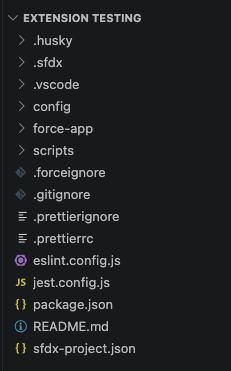
Within VS Codes command palette, I searched for SFDX: Create Project and selected standard. This created starter files.
Setting org-name
Within project-scratch-def.json I set up the orgName to “Learning VS Code”. I have afeeling I should have used the org name I just set up… which I have forgotten. I will ignore this for now.
Authenticating to my playground
Using the command palette, don’t forget commands start with >, run SFDX: Authorize an Org.
Create an Apex Class?
Okay, what on earth is an Apex class…
An Apex class in Salesforce is a blueprint or template used to create objects, encapsulating variables (data) and methods (behavior) using the object-oriented Apex programming language. It enables developers to implement complex business logic, perform database operations, and extend Salesforce functionality beyond declarative tools.
Okay…
We are creating one by right clicking the directory force-app/main/default/classes and selecting SFDX: Create Apex Class.
Doing that I now have two new filese in the classes directory:
- AccountController.cls
- AccountController.cls-meta.xml
I have copied the following into AccountController.cls
public with sharing class AccountController {
  public static List<Account> getAllActiveAccounts() {
    return [SELECT Id, Name, Active__c FROM Account WHERE Active__c = 'Yes' WITH SECURITY_ENFORCED];
  }
}
The query here is in Salesforce Object Query Language (SOQL).
You can run any query against an org by highlighting the query and using the following command:
>SFDX:Execute SOQL Query with Currently Selected Text
My first error ✨
Account WHERE Active__c = 'Yes' WITH SECURITY_ENFORCED ^ ERROR at Row:1:Column:65 SECURITY_ENFORCED not allowed in this context
This error tells me that my query is getting somewhere but that somewhere doesn’t like it.
I removed the with clause and got a new error:
SELECT Id, Name, Active__c FROM Account WHERE Active__c ^ ERROR at Row:1:Column:18 No such column 'Active__c' on entity 'Account'. If you are attempting to use a custom field, be sure to append the '__c' after the custom field name. Please reference your WSDL or the describe call for the appropriate names.
Success
Changing my query to:
public with sharing class AccountController {
  public static List<Account> getAllActiveAccounts() {
    return [SELECT Id, Name FROM Account];
  }
}
returned a list of accounts!
Deploying to my org
To deploy this apex class, or perhaps, my source, to my org I can right click on the AccountController.cls (my class file) and use SFDX: Deploy This Source to Org.
It deployed!
Where did it go…
My playground org and another org I have don’t seem to have the new Apex Class. I can check via going into the Org UI -> Setup -> Apex Classes and looking at the list. Nothing new in there…
I’m not sure what’s going on there but I will move on for now.
Written on May 12th, 2026 by Chris Meardon